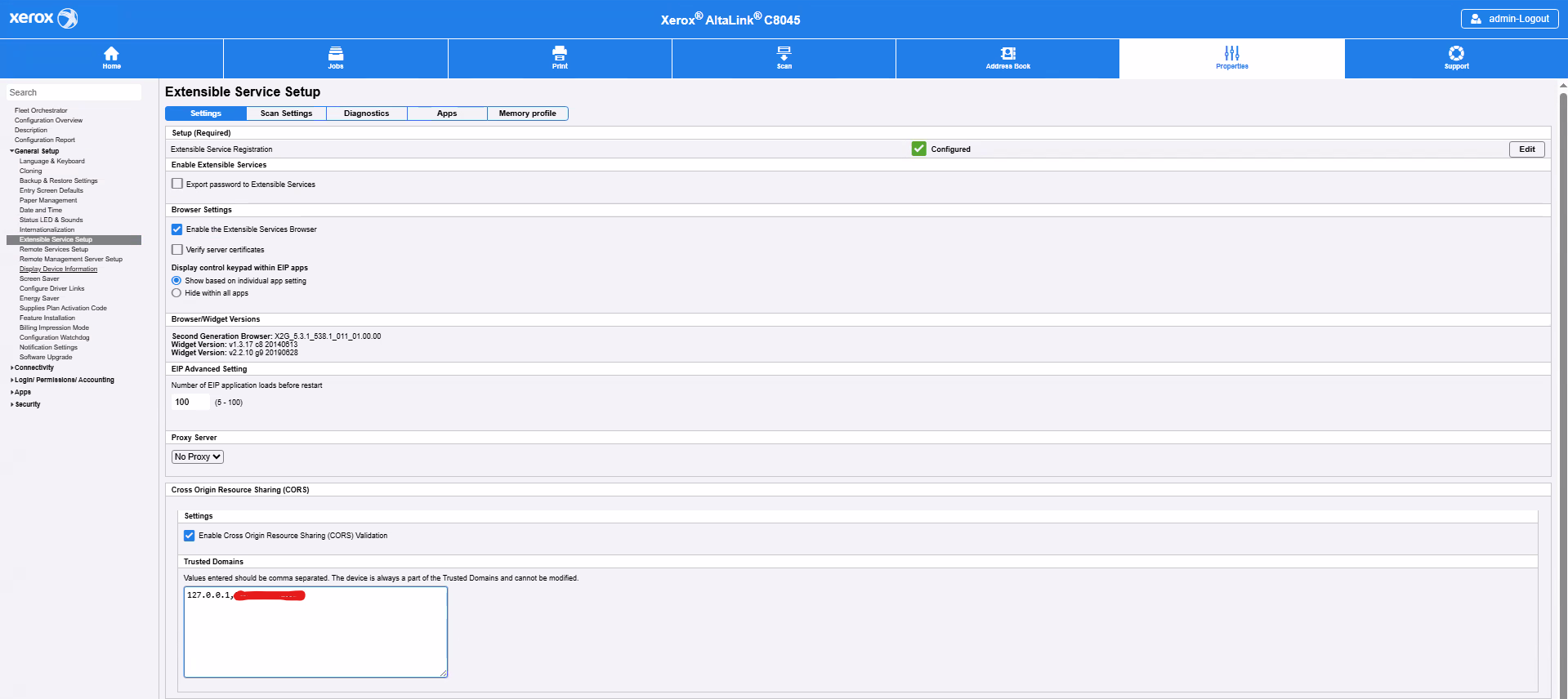
Kofax Front Office Server - not allowed by Access-Control-Allow-Orgin
When using a MFP Scanner user receives this error "Error: Not able to Load URL https://127.0.0.1/Webservices/office/* Reason: Orgin 000.000.000.000 is not allowed by Access-Control-Allow-Orgin.
Versions:4.3+
Problem: When using a MFP Scanner user receives this error "Error: Not able to Load URL https://127.0.0.1/Webservices/office/* Reason: Orgin 000.000.000.000 is not allowed by Access-Control-Allow-Orgin.
Resolution: 1. Navigate: Go to Properties > General Setup > Extensible Service Setup. 2.Whitelist Domains: Add required origins (e.g., 000.000.000.000) to the permitted domains list to prevent CORS access errors.