---
title: Bulk Downloading of Documents
description: Discuss this process.
---
[Skip to content](https://knowledgebase.metasource.com/workdocs/bulk-downloading-of-documents#main-content)
[](https://www.metasource.com/)
Open main navigation
Close main navigation
- [Return to WorkDocs™](https://sourcehr.filebound.com/LogOn.aspx)
[Return to WorkDocs™](https://sourcehr.filebound.com/LogOn.aspx)
Hello. How can we help you?
- There are no suggestions because the search field is empty.
1. [WorkDocs Customer Knowledge Center](https://knowledgebase.metasource.com/workdocs?hsLang=en-us)
2. [Taking Action](https://knowledgebase.metasource.com/workdocs/taking-action?hsLang=en-us)
November 11, 2025
# Bulk Downloading of Documents
There are times when you need to get copies of one or more documents that are in WorkDocs. This could be to prepare for an audit, answer a legal or compliance request or for other reasons. WorkDocs makes it easy to download documents from the Document Web Viewer. The documents are organized into one zipped file which can then be used or shared as needed.
When you do a search in WorkDocs, any documents in the search results can be selected and viewed in the Document Web Viewer. The documents you want to download can be based on a particular worker, type of document, etc. Currently, WorkDocs allows you to download up to 25 documents at a time.
**Note:** You can download documents from the Document Web Viewer no matter how you got to the viewer. It does not have to start from a Search. If you are on the viewer, you can download up to 25 documents.
Let’s look at the process from Search Results.
#### **Search Results**
**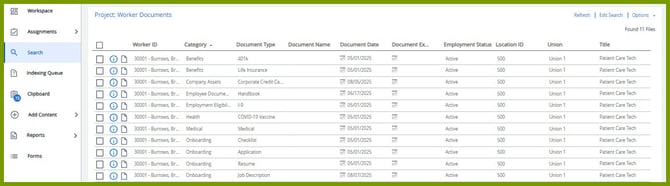**
In this example, your search is for all the documents for a particular worker. However, the search could have been done for other situations. The results of the search are listed on this page; a page can have up to 25 items in the list. WorkDocs allows you to select up to 25 items and view them in the Document Web Viewer.
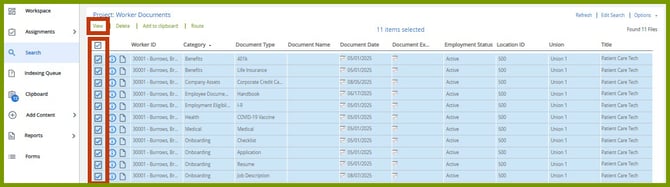
Select the documents that you want to include in the download, up to 25, to bring them into the Document Web Viewer. To select all the documents on the page, click the checkbox on top in the heading row. Or you can click the checkbox preceding the items you want to include. Then select **View**.
#### **Document Web Viewer**
**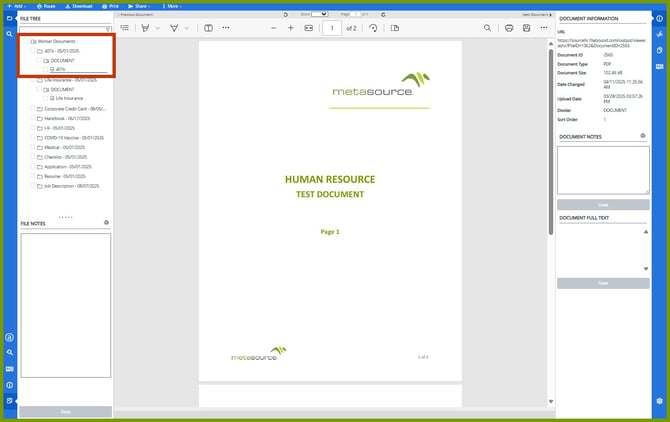**
The Web Viewer opens with the first item in the list expanded in the File Tree. You’ll need to expand each item in the File Tree so you can select each document to include in the download.
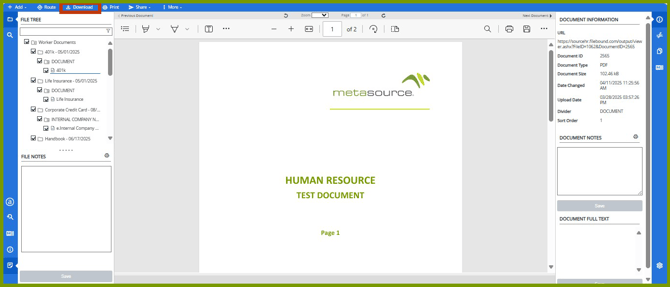
Once the File Tree is expanded, select the checkbox preceding the first item, in this case, Worker Documents. This selects all the items on the list.
Select **Download**. The documents are zipped and placed in your computer’s Download folder with the name, Documents (1).zip. You can take the file and move it to another folder, email it, etc.
- [Getting Started](https://knowledgebase.metasource.com/workdocs/getting-started?hsLang=en-us)
- [Taking Action](https://knowledgebase.metasource.com/workdocs/taking-action?hsLang=en-us)
- [Using Features](https://knowledgebase.metasource.com/workdocs/using-features?hsLang=en-us)
- [Reports](https://knowledgebase.metasource.com/workdocs/reports?hsLang=en-us)
[](https://www.metasource.com/)
[getsupport@metasource.com](mailto:getsupport@metasource.com)
[(888) 634-7684](tel:18886347684)
© 2025 MetaSource, LLC. All rights reserved.