---
title: Clipboard
description: Discuss this process.
---
[Skip to content](https://knowledgebase.metasource.com/workdocs/clipboard#main-content)
[](https://www.metasource.com/)
Open main navigation
Close main navigation
- [Return to WorkDocs™](https://sourcehr.filebound.com/LogOn.aspx)
[Return to WorkDocs™](https://sourcehr.filebound.com/LogOn.aspx)
Hello. How can we help you?
- There are no suggestions because the search field is empty.
1. [WorkDocs Customer Knowledge Center](https://knowledgebase.metasource.com/workdocs?hsLang=en-us)
2. [Using Features](https://knowledgebase.metasource.com/workdocs/using-features?hsLang=en-us)
December 29, 2025
# Clipboard
The **Clipboard** is an area where each user can compile, gather, and place files. When you place a file in your Clipboard, it does not move the file, the Clipboard is only a pointer to the actual file.
Files can be moved to your Clipboard from various places in WorkDocs. Anywhere there is a list of items, you can select items and place them in your Clipboard.
#### **Using the Clipboard**
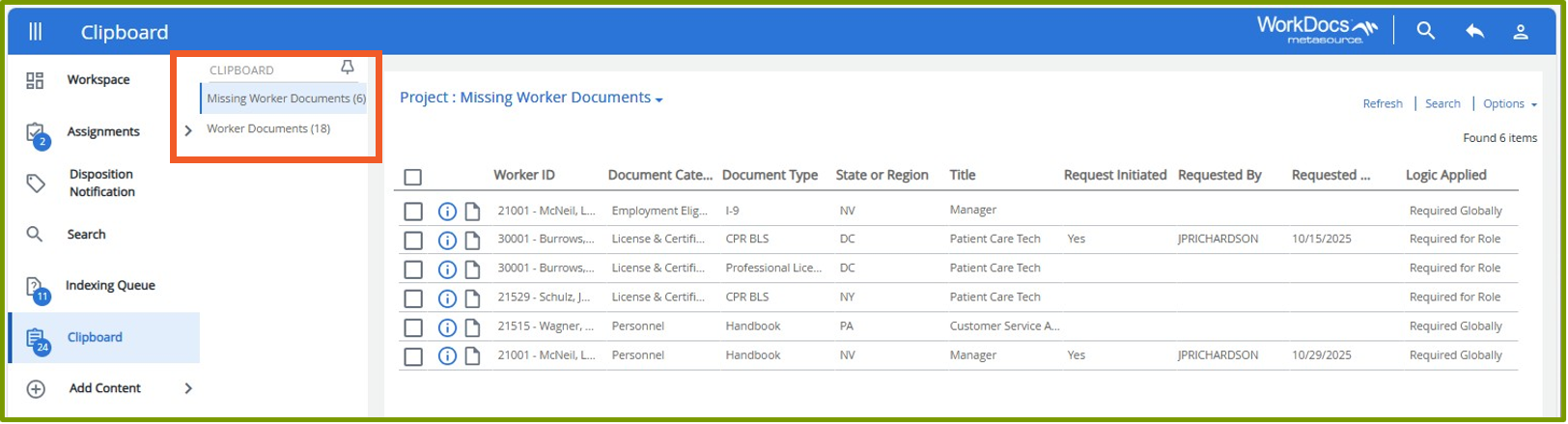
Once you place items in the Clipboard, you can go to Clipboard to view the list and act on the items. Items are grouped by project. The middle column allows you to select which project list you want to view.
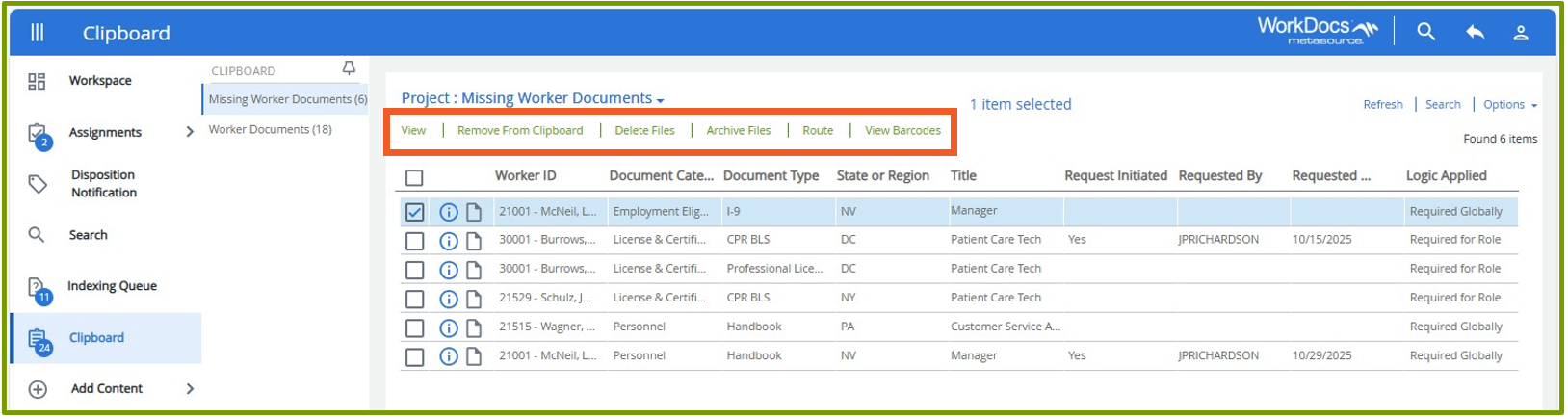
Click the checkbox preceding the items to select them from the list. Several options are displayed at the top of the screen.
- **View –** Opens the document in the document viewer where you can review and act on the document.
- **Remove From Clipboard –** Removes the file from your Clipboard but does not delete the file.
- **Delete Files –** This removes the file from your Clipboard and deletes it entirely from WorkDocs.
- **Archive Files –** Allows you to archive files you don’t currently need. You can still locate the document in WorkDocs.
- **Route –** Allows you to route the files on your Clipboard to a workflow process.
- **View Barcodes –** Allows you to print barcodes that can be used when scanning new files into WorkDocs.
- [Getting Started](https://knowledgebase.metasource.com/workdocs/getting-started?hsLang=en-us)
- [Taking Action](https://knowledgebase.metasource.com/workdocs/taking-action?hsLang=en-us)
- [Using Features](https://knowledgebase.metasource.com/workdocs/using-features?hsLang=en-us)
- [Reports](https://knowledgebase.metasource.com/workdocs/reports?hsLang=en-us)
[](https://www.metasource.com/)
[getsupport@metasource.com](mailto:getsupport@metasource.com)
[(888) 634-7684](tel:18886347684)
© 2025 MetaSource, LLC. All rights reserved.