
Applies to Versions:
22.2
Summary:
When searching for full-text after submitting the document we receive this error: Unable to run the query. Details: There is an issue with xPlore, please check xPlore log. Message: java.lang.NullPointerException.
This could be because xPlore has not been configured fully.
Resolution:
1. Go to xPlore Folder > Config > Open IndexServerconfig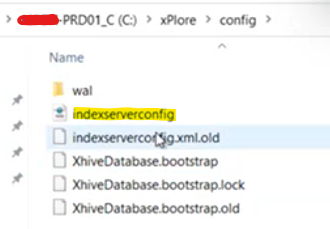
2. Search for sub_paths and ae_doc_id or ax_doc_id pending what version you're on.
3. If you do not find any you will need to add somelines to your xml file.
4. Search "sub-path" and add these two new sub-path's before the closing tag </path-value-index>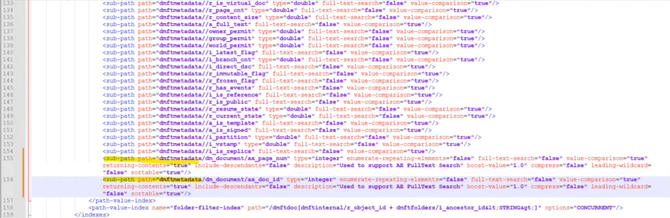
<sub-path path=dmftmetadata/dm_document/ax_page_num" type="integer" enumerate-repeating-elements="false" full-text-search="false" value=comparison="true" returning-contents="true" include-descendants="false" description="Used to support AE FullText Search" boost-value="1.0" compress="false" leading-wildcard="false" sortable="true"/>
<sub-path path="dmftmetadata/dm_document/ax_doc_id" type="integer" enumerate-repeating-elements="false" full-text-search="false" value=comparison="true" returning-contents="true" include-descendants="false" description="Used to support AE FullText Search" boost-value="1.0" compress="false" leading-wildcard="false" sortable="true"/>
5. Restart Indexing Service and xPlore Services.
6.Create a new Domain: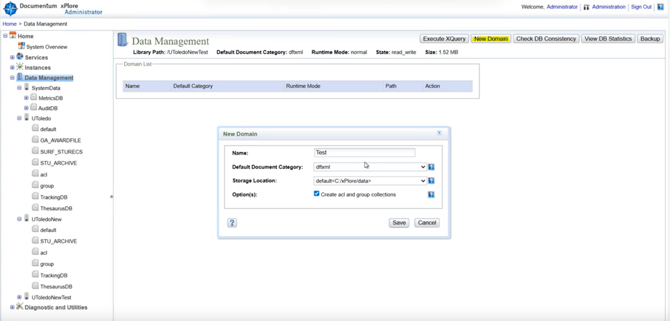
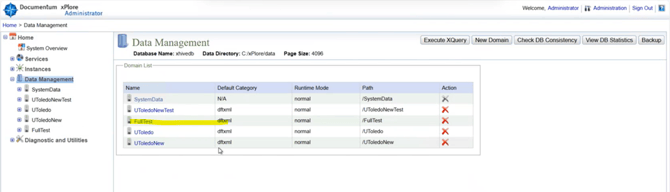
7.Create New collection: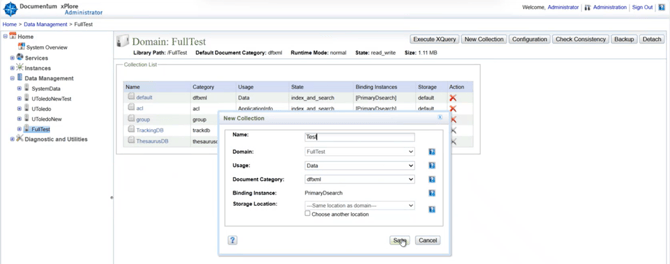
8.Assign the new collection to AE Application: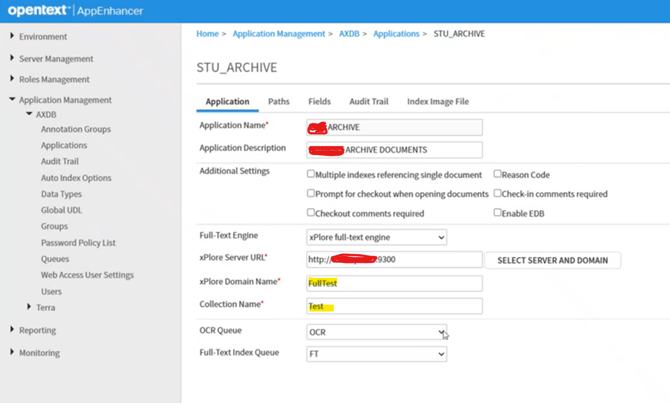
9.Save that Application.
10.Restart Indexing Service and xPlore Services.
(optional, restart iis)
To test:
Login to AE in Incognito Mode.
Submit document again. Verify processing in the queues in AE Admin.